Harmony Horizon耳から、声へ
Get in touch
HARU

AI Journey

From Montréal

Hi, I’m HARU.

Building with AI, every day.

I build English courses, short restaurant videos, and payment-to-thank-you-email systems with AI, by myself, and run them for real. This page is an honest log of what I got done each day.

  • Booking & payment automation
  • Social media automation
  • AI agents
  • Selling online
  • Websites
  • AI voice & short videos

Build log

What I built today

What worked and what didn’t, written down as it happened.

  1. I’m comparing two ways to use ElevenLabs

    • Right now, I connect ElevenLabs to a system I built myself. It runs the voice AI that plays the shop staff in my courses
    • In September, ElevenLabs announced that its MCP, which connects straight to Claude, can now do more. Inside a chat with Claude, you can make not only voices but also music, sound effects, images and video
    • For things I make by trial and error, working directly in a chat with Claude looks faster
    • For things that run on their own at the same time every day, I think my current setup is the safer choice
    • I haven’t decided yet. I’ll test it first, then choose

    Words used here

    • ElevenLabs: a service that makes voices and sounds with AI
    • MCP: a kind of shared plug that connects an AI to other services. Once it’s connected, Claude can use that service directly
  2. I tidied up my scheduled videos and learned how API tokens (keys) work

    • I swapped in new versions of 7 scheduled videos in Buffer (5 YouTube Shorts and 2 Instagram Reels). The videos were saved to Cloudflare R2 first. The captions and times stayed the same
    • I scheduled 3 new Instagram carousels and 8 new Threads posts
    • I fixed the YouTube titles
    • What I noticed: titles that start with Japanese quotation marks (「」) don’t seem to get many views. Adding #Shorts seems to help (this is from my own experience)
    • I made a page where you can listen to a sound for a lesson, and published it
    • I checked that the Cloudflare key could save to R2 and send email. I deleted the test file afterwards
    • A mistake: each slot can hold only one key. When I put in the key for R2, it replaced the email key, so R2 and email stopped working for a while
    • So I made one key that does both: sending email and saving videos

    Words used here

    • Cloudflare R2: Cloudflare’s storage. Think of it as a warehouse for video files. Buffer can’t take files directly; it reads videos from a link on the internet. That’s why the videos go to R2 first
    • API token: a key for Cloudflare. Like a password, you never show it to anyone. With this key, I can save to R2 and send email
    • Buffer: a tool that posts to YouTube, Instagram and Threads at a set time
    • Carousel: an Instagram post with several images you swipe through
    • Shorts: YouTube’s short vertical videos
  3. Scheduling videos taught me two small but important lessons

    • I got videos saving to Cloudflare R2 and then scheduled through Buffer
    • Saving to R2 needed a new token (a kind of digital key)
    • After I added the new token to Claude Code, it only started working once I opened a new thread
    • I learned that “Bearer” must be followed by one space. A single missing space is enough to stop everything
See earlier entries (6)Show fewer
  1. Today I finished off the email side

    • When someone buys, they’re added to my list and get a guide email, and that now runs with no go-between service
    • I built a listening quiz as the entry point of my funnel. After answering, anyone who signs up for the email gets their result and three pronunciation tips automatically
    • The daily course emails are now sent from my own site too
    • I switched off the old automatic setup I no longer use
    • I added a page where people who signed up for the 10/15 lesson can hear one sound
    • I added new linked sounds to my pronunciation-tips library
  2. Today I worked with 15 Claude thread assistants

    • I re-checked how my social posts are doing. The ones reaching people best are the text quizzes
    • I switched my email delivery so it’s sent from my own site
    • Right after someone signs up for the 10/15 lesson, a thank-you email now goes out automatically
    • I re-researched how to check pronunciation, this time from official sources
    • The purchase flow now works live, without any extra service in between. When someone buys, they’re added to my list automatically and get a guide email
    • AI makes it, another AI reviews the English and the design, and I look last. This flow is slowly taking shape
    • Claude couldn’t reach YouTube Studio directly, so I’ll schedule through Buffer or by hand
  3. Purchases now sign people up automatically, and social media review became a system

    • When someone buys through the new link, they’re added to my list automatically and get an information email. It now works without an outside go-between service, and I confirmed it live
    • Four agents review Instagram, Threads and YouTube posts against rules I wrote. Only what passes, and only after my OK, is scheduled straight into Buffer
    • I gathered my pronunciation tips and linking-sound patterns into one database. I no longer rewrite them each time; I can pull what I need from it
    • I also made a loop video that returns to the start when it ends. I haven’t reviewed the final result yet
  4. Split the work into makers and reviewers to protect quality

    • One Claude makes, one reviews the English, and one reviews the design. Nothing reaches me until both reviewers say PASS
    • Built two skills: Threads quiz posts and a weekly sales review. I just say “one quiz” and it goes from making to review, checking and scheduling
    • Defined a growth agent, and I’m building a new entry point: sign up through the quiz and get a short series of emails
  5. Got automatic social posting running, and tidied up my emails and this page

    • Videos, carousels and photos now go from Claude Code through Buffer to Instagram, Threads and YouTube
    • At first the work environment couldn’t reach the internet. I opened network access, added the keys, and got it running
    • Prepared the emails for my English course and organized my email marketing tool
    • Reviewed the whole flow for getting posts onto social media
    • Made this page and the contact form trilingual: Japanese, English and French
    • Added real examples to this page: an AI that talks back by voice (ElevenLabs) and automatic social posting (Buffer)
    • Showed how AI picks from my saved English tips and turns them into social posts automatically
  6. Built this page and redesigned the whole site

    • Published the “AI Journey” page
    • Switched every page to one clean, easy-to-read typeface
    • Added a logo and moved to a clean white layout with rounded cards

Made with AI

What I’ve built

Everything here is live and working. Because I build with AI, I can make things fast and fix them just as fast.

Courses

English courses, built solo, all the way to sales

Listening and speaking courses for real situations, like ordering at a restaurant or going through airport immigration. I built more than the lessons: sign-up, payment, a check that each payment really went through, and a limit on practice sessions. They are on sale now.

Each sales page was built and published in one day

Claude Code · Stripe API · AI voice · Vercel

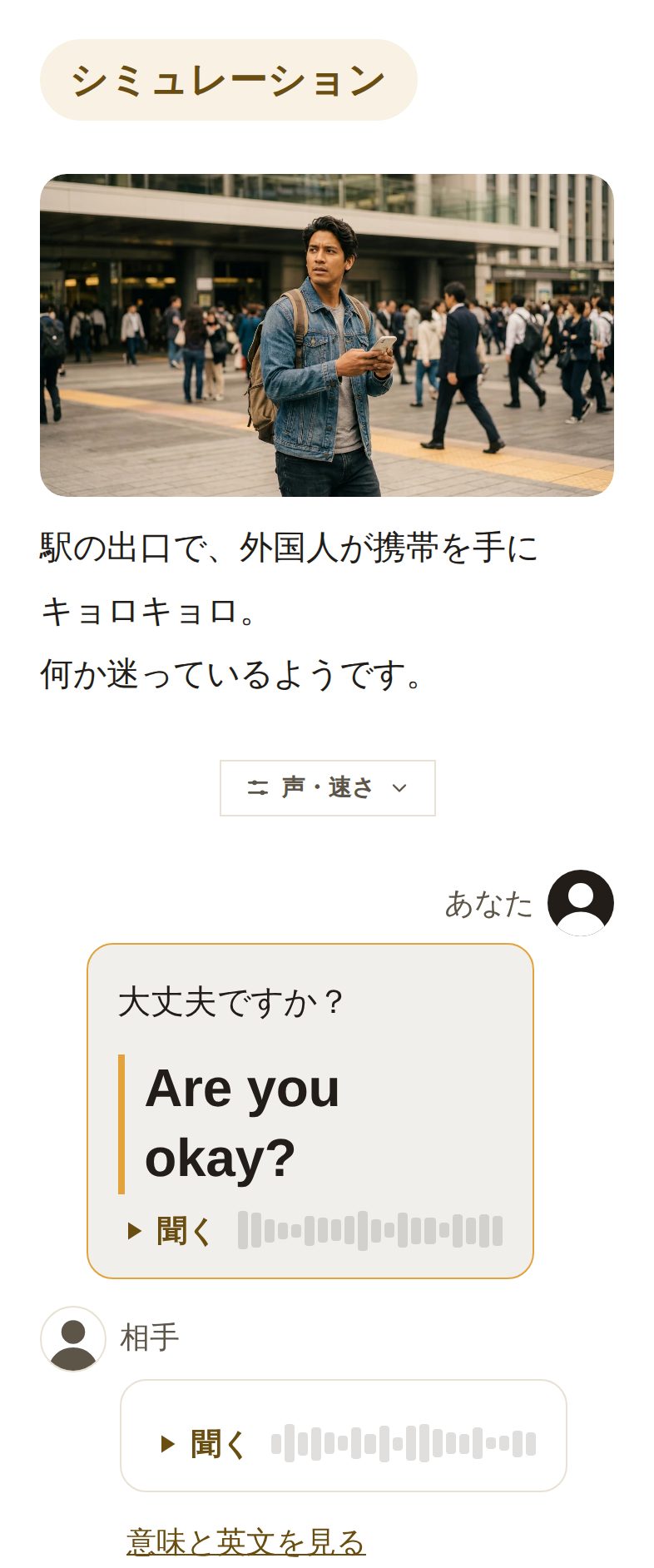
A course conversation simulation: helping a lost traveler at a station exit, in English

Automation

Turning manual work into systems that run themselves

I connect tools so that data entry and follow-up emails happen on their own. These are running right now.

The payment-to-thank-you-email flow took under 10 minutes to set up

  • When a video or photo is readyClaude Code schedules it on Instagram, Threads and YouTubeBuffer · Cloudflare R2
  • When a payment goes throughthe buyer is added to the list and gets a thank-you emailStripe · Vercel · Cloudflare
  • When someone buysa welcome email with how-to steps goes out automaticallyVercel · Cloudflare
  • Every time the site changestext size, tap targets and mobile layout are checked automaticallyPlaywright

AI talk

A voice AI agent that plays the server

For each scene, an AI agent with its own role and rules plays the restaurant server and answers your English out loud. Its instructions keep it on topic, and it counts how many sessions each purchase includes. The same approach can be applied to AI agents for phone lines, front desks and customer service.

ElevenLabs Agents · API

AI voice

Clear audio, no recording studio

The course dialogues use AI voices, so there’s no studio or voice actor. Change a line and the audio is regenerated on the spot. When the sound got quiet on iPhones, I found the cause and fixed it myself.

ElevenLabs API

Website

A renovation company website (sample)

A French and English site for a home renovation company in Montréal. The name “Soleil Rénovation” and the projects shown are made up for this sample.

I started this sample site in the morning and finished it by lunch

This AI Journey page went live in 3 hours

Content

Social media posts, built automatically from a database

AI picks from my own library of English tips and turns them into educational content. It can add AI voice narration and English or French subtitles. Short vertical videos for local restaurants come together from my footage and my own words.

Claude Code · AI voice · Buffer

  • ReelsEnglish tips and short vertical restaurant videos
  • Quiz ReelsEnglish quizzes viewers answer as they watch
  • Stories & ThreadsPosts shaped for each format
  • CarouselsSwipeable image posts, made with AI too

For you

I don’t just use AI. I build with it.

I don’t stop at asking AI questions. I build working things with it, so building is fast and fixes are quick. Here’s the kind of thing it can do:

  • Booking & payment automation

    Connect sign-up, payment, confirmation emails and your customer list, and say goodbye to typing it all in by hand!

  • Social media posting automation

    Schedule videos, carousels and photos to Instagram, Threads and YouTube in one go, and put your emails and weekly reminders on autopilot too.

  • AI agents that answer customers

    An AI that answers common questions, by text or by voice, following your company’s rules. It’s easier than you’d think!

  • Repetitive office tasks

    Put form entries into a spreadsheet, send the weekly report, and automate whatever you do by hand every time, in no time.

  • Websites

    In Japanese, English and French, and other languages too. Checked right down to the first screen on a phone, with fixes right after launch. That’s the amazing part!

  • Short videos & AI voice

    From your footage and the words you want to say, I put together subtitles (English and French) and narration. Pick the voice you like and the audio is made with AI. I can even make a photo talk with lip sync.

Let’s build something together.

Have something you’d like built? Questions and feedback are welcome too.

Get in touch